Creating Agents with Langchain Deep Agents
Creating Agents with Langchain deep agents
Agentic Engineering
Agentic engineering represents a shift in how we approach software development and automation.
Instead of treating artificial intelligence as a simple code generation tool or an isolated assistant, this paradigm models AI agents as collaborative digital team members.
In an agentic engineering system, one or multiple specialized agents work together to execute complex workflows that mirror the operations of real-world engineering teams.
Deep Agents Library
Deep Agents is a framework that enables the complete harnessing of agents. It simplifies the process of building multi-agent systems by providing a set of tools and capabilities that make it easier to build and manage agents.
An agent harness is the software infrastructure that wraps around an AI model. It bridges the model’s reasoning with real-world actions by providing operational control for multi-step workflows, integrating external tools and environments, managing long-term memory across sessions, and enforcing safety guardrails.
To learn more: The Anatomy of an Agent Harness
To put Deep Agents to work and test it in the field, we will implement an agentic system specialized in financial reporting that analyzes a company’s financials and produces an investment report.
We will use the SEC EDGAR database to retrieve company financial data through the EdgarTools library.
The Financial Analyst Agent Demo
We want to create an autonomous agentic system that produces financial reports for publicly traded companies.
This application assembles a team of AI analysts to evaluate a company’s financial health and produce a comprehensive investment report. The software reads real-world data from SEC filings, processes the information, and generates a structured analysis.
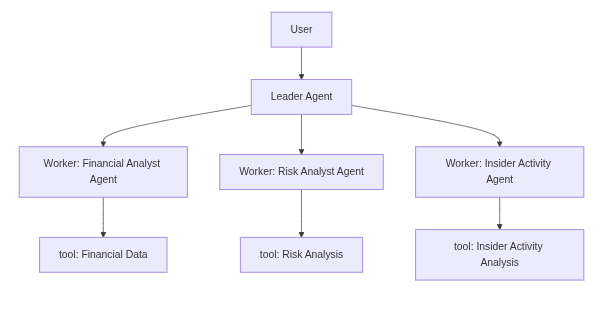
This system perfectly illustrates the agentic engineering model. It utilizes a central leader agent to orchestrate the entire research workflow. When a user requests an analysis of a specific company, the leader breaks down the request, delegates the quantitative and qualitative research to specialized worker agents, and finally synthesizes their individual findings into a final report.
The Architecture
The architecture of the financial analyst system is as follows:
Tools and Edgar Integration
For the worker agents to perform their research, they need access to external data. This is achieved through a set of specialized tools defined in the system.
Our financial analyst system leverages the EdgarTools library, which provides a set of tools to retrieve company financial data from the SEC EDGAR database. These tools are converted into callable tools by the deep agent framework.
The Leader Prompt
The behavior and workflow of the entire system are governed by the system prompt assigned to the leader agent.
The leader prompt in our financial system instructs the agent to act as a senior investment analyst coordinating a team of specialists. It explicitly outlines the workflow.
The leader must plan the analysis by breaking it down into logical steps and it must delegate the specific analytical tasks to the appropriate subagents, then the leader is instructed to synthesize the findings by reading the intermediate files produced by the team and compiling a final investment summary with specific required sections. Lastly, it must deliver the final report to the user.
The prompt also enforces key principles, reminding the leader to always plan before acting, to let the specialists handle the granular details, and to save all work using the virtual filesystem tools.
Worker Subagents using tools
The analytical work is carried out by specialized worker subagents, demonstrating the power of context isolation.
Each subagent focuses entirely on one specific analytical domain, equipped with its own unique system prompt and a restricted set of tools. This prevents massive documents, like a 10-K report, from polluting the reasoning capabilities of the main leader agent.
Example: For quantitative data, a specialized financial analyst agent can invoke a tool to retrieve a company’s balance sheet, income statement, or cash flow statement.
For qualitative analysis, another tool extracts specific sections from 10-K annual reports, such as management discussion or risk factors, and these data are studied by a risk analyst agent.
Additionally, an insider activity analyst agent is responsible for tracking insider buying and selling patterns.
Langsmith: The observability layer
Agentic systems are notoriously non-deterministic and involve complex, multi-step workflows where agents interact with each other and external tools. This complexity makes traditional debugging methods insufficient. This is where an observability layer becomes critical.
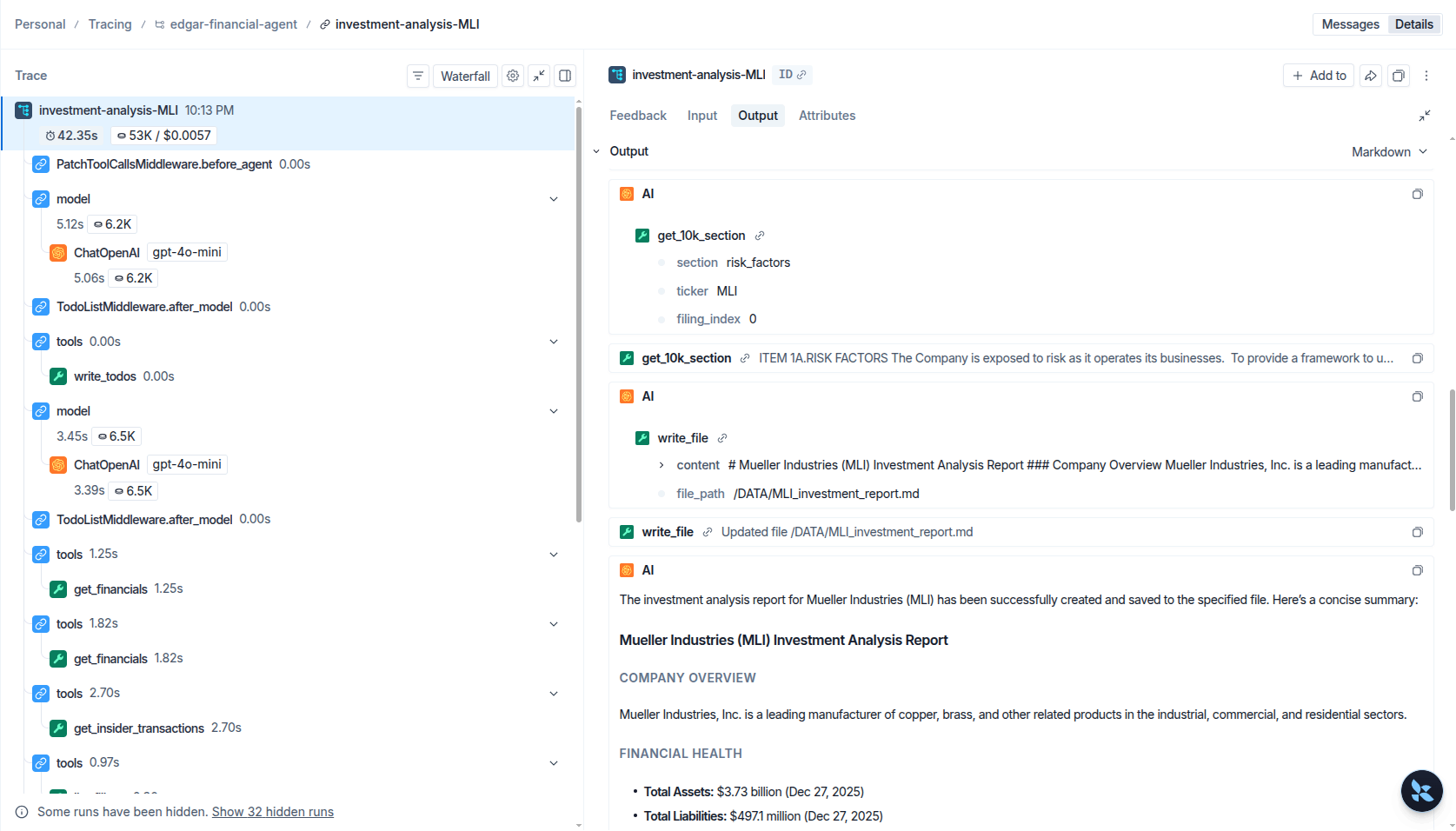
LangSmith is a unified developer platform designed specifically for building, testing, and monitoring LLM applications. In our financial analyst system, LangSmith acts as the observability layer, providing end-to-end tracing of every action the agents take.
This level of visibility is very useful in agentic engineering to debug complex behavior, evaluate agent trajectories, and improve the overall performance and reliability of the system over time.
The Implementation
Let’s dive into the code to see how these concepts are implemented.
1. The Leader Agent
The Leader Agent orchestrates the entire process. Its prompt explicitly defines the workflow (Plan, Delegate, Synthesize, Deliver) and the principles it must follow:
1
2
3
4
5
6
7
8
9
10
11
12
13
14
15
16
17
18
19
20
21
22
23
24
25
26
27
28
29
30
31
32
33
LEADER_PROMPT = """\
You are a senior investment analyst leading a team of specialists.
Your job is to produce a comprehensive investment analysis report for
a given company by coordinating your team.

## Your Workflow

1. **Plan**: Break the analysis into steps using the todo list.
   Typical steps: financial analysis, risk review, insider activity check, synthesis.

2. **Delegate**: Assign each analytical task to the appropriate specialist:
   - financials-analyst: for balance sheets, income statements, ratios
   - risk-analyst: for 10-K risk factors and management discussion
   - insider-activity-analyst: for Form 4 insider transaction patterns

3. **Synthesize**: Read the files produced by your team, then write a final
   investment summary to /investment_report.md with sections:
   - Company Overview
   - Financial Health
   - Key Risks
   - Insider Signals
   - Conclusion & Outlook

4. **Deliver**: Present the final report to the user.

## Principles
- Always plan before acting.
- Let specialists handle the detail; you focus on the big picture.
- Save all intermediate work to the virtual file system (write_file).
- When the user asks to save a report to disk, use the `save_report` tool
  with a filename and the full content. Files are saved to the DATA/ folder.
- Be specific with company tickers when delegating.
"""
2. Subagents
Subagents (or Worker Agents) are defined as dictionaries containing their name, description, system prompt, and the specific tools they are allowed to use.
The demo defines three specialists—financials, risk, and insider activity—and passes them to the leader as all_subagents:
1
2
3
4
5
6
7
8
9
10
11
12
13
14
15
16
17
18
19
20
21
22
23
24
25
26
27
28
29
30
31
32
33
34
35
36
37
38
39
40
41
42
43
44
45
46
47
48
49
50
51
52
53
54
55
56
57
58
from tools import get_financials, get_10k_section, get_insider_transactions


financials_subagent = {
    "name": "financials-analyst",
    "description": (
        "Analyzes a company's financial statements (balance sheet, income "
        "statement, cash flow) and identifies key trends, strengths, and "
        "red flags. Delegates to this agent for quantitative financial analysis."
    ),
    "system_prompt": (
        "You are a financial analyst specializing in fundamental analysis.\n"
        "When given a company to analyze:\n"
        "1. Retrieve the balance sheet and income statement.\n"
        "2. Calculate or note key metrics: revenue growth, profit margins, "
        "debt-to-equity, current ratio.\n"
        "3. Write your findings to /financials_analysis.md.\n"
        "4. Flag any concerning trends (declining revenue, rising debt, etc.)."
    ),
    "tools": [get_financials],
}

risk_subagent = {
    "name": "risk-analyst",
    "description": (
        "Reads 10-K risk factors and management discussion sections to "
        "identify strategic risks, competitive threats, and forward-looking "
        "concerns disclosed by the company."
    ),
    "system_prompt": (
        "You are a risk analyst who reads SEC 10-K filings.\n"
        "When given a company:\n"
        "1. Read the risk_factors and management_discussion sections.\n"
        "2. Categorize risks: operational, financial, regulatory, competitive.\n"
        "3. Note any new risks vs. prior filings if context allows.\n"
        "4. Write your risk assessment to /risk_assessment.md."
    ),
    "tools": [get_10k_section],
}

insider_subagent = {
    "name": "insider-activity-analyst",
    "description": (
        "Tracks insider buying and selling patterns from Form 4 filings "
        "to assess management confidence and potential signals."
    ),
    "system_prompt": (
        "You are an analyst tracking insider transactions.\n"
        "When given a company:\n"
        "1. Retrieve recent Form 4 filings.\n"
        "2. Summarize who traded, direction (buy/sell), and amounts.\n"
        "3. Note if there's a pattern (cluster of selling, large buys, etc.).\n"
        "4. Write your findings to /insider_activity.md."
    ),
    "tools": [get_insider_transactions],
}

all_subagents = [financials_subagent, risk_subagent, insider_subagent]
3. Tools
Tools are standard Python functions that the framework converts into callable actions for the agents. The leader receives every tool (including list_filings for orientation and save_report for writing deliverables to disk); each subagent is restricted to the subset it needs. The following module uses edgartools (from edgar import Company, set_identity) as the gateway to SEC EDGAR:
1
2
3
4
5
6
7
8
9
10
11
12
13
14
15
16
17
18
19
20
21
22
23
24
25
26
27
28
29
30
31
32
33
34
35
36
37
38
39
40
41
42
43
44
45
46
47
48
49
50
51
52
53
54
55
56
57
58
59
60
61
62
63
64
65
66
67
68
69
70
71
72
73
74
75
76
77
78
79
80
81
82
83
84
85
86
87
88
89
90
91
92
93
94
95
96
97
98
99
100
101
102
103
104
105
import os

from edgar import Company, set_identity

set_identity("your-email@example.com")  # required by the SEC for programmatic access

# --- EDGAR tools ---


def get_financials(ticker: str, statement: str = "balance_sheet") -> str:
    """Retrieve a company's financial statement from SEC EDGAR.

    Args:
        ticker: Stock ticker symbol (e.g. "AAPL", "MSFT").
        statement: One of "balance_sheet", "income_statement", "cash_flow".

    Returns:
        The financial statement as formatted text.
    """
    company = Company(ticker)
    financials = company.get_financials()
    if statement == "income_statement":
        return str(financials.income_statement())
    elif statement == "cash_flow":
        return str(financials.cash_flow_statement())
    else:
        return str(financials.balance_sheet())


def get_10k_section(ticker: str, section: str = "management_discussion", filing_index: int = 0) -> str:
    """Read a specific section from a company's 10-K annual report.

    Args:
        ticker: Stock ticker symbol.
        section: One of "management_discussion", "risk_factors", "business".
        filing_index: Which 10-K to read (0 = most recent).

    Returns:
        The requested section text (truncated to 8000 chars for context management).
    """
    company = Company(ticker)
    filings = company.get_filings(form="10-K")
    report = filings[filing_index].obj()
    text = getattr(report, section, f"Section '{section}' not found.")
    return str(text)[:80000]


def get_insider_transactions(ticker: str, num_filings: int = 5) -> str:
    """Get recent insider transactions (Form 4) for a company.

    Args:
        ticker: Stock ticker symbol.
        num_filings: How many recent Form 4 filings to retrieve.

    Returns:
        Summary of recent insider trades.
    """
    company = Company(ticker)
    filings = company.get_filings(form="4")
    results = []
    for i in range(min(num_filings, len(filings))):
        form4 = filings[i].obj()
        results.append(str(form4))
    return "\n---\n".join(results) if results else "No insider transactions found."


def list_filings(ticker: str, form: str = "10-K", count: int = 10) -> str:
    """List available SEC filings for a company.

    Args:
        ticker: Stock ticker symbol.
        form: Filing type (e.g. "10-K", "10-Q", "8-K", "4").
        count: How many filings to list.

    Returns:
        List of available filings with dates.
    """
    company = Company(ticker)
    filings = company.get_filings(form=form)
    entries = []
    for i in range(min(count, len(filings))):
        entries.append(f"[{i}] {filings[i]}")
    return "\n".join(entries) if entries else f"No {form} filings found for {ticker}."


# --- Disk I/O (leader can persist final reports outside the virtual FS) ---

OUTPUT_DIR = os.path.join(os.path.dirname(os.path.abspath(__file__)), "DATA")


def save_report(filename: str, content: str) -> str:
    """Save a report to the local DATA/ directory on disk.

    Args:
        filename: Name of the file to create (e.g. "MSFT_investment_report.md").
        content: The full text content to write.

    Returns:
        Confirmation message with the absolute path of the saved file.
    """
    os.makedirs(OUTPUT_DIR, exist_ok=True)
    filepath = os.path.join(OUTPUT_DIR, filename)
    with open(filepath, "w", encoding="utf-8") as f:
        f.write(content)
    return f"Report saved to {filepath}"
4. LangSmith Integration
To enable global observability, the application checks for LangSmith environment variables (LANGSMITH_API_KEY and LANGSMITH_TRACING). When these are present, LangChain automatically instruments every LLM call, tool invocation, and sub-agent execution:
1
2
3
4
5
6
7
8
9
10
11
12
13
import os
from dotenv import load_dotenv

load_dotenv()

# When LANGSMITH_API_KEY is set, LangChain automatically instruments the entire workflow.
_langsmith_configured = bool(os.environ.get("LANGSMITH_API_KEY")) and os.environ.get("LANGSMITH_TRACING", "").lower() == "true"

if _langsmith_configured:
    print(f"[Observability] LangSmith tracing ENABLED — project: {os.environ.get('LANGSMITH_PROJECT', 'default')}")
    print(f"[Observability] View traces at: https://smith.langchain.com\n")
else:
    print("[Observability] LangSmith tracing DISABLED — set LANGSMITH_API_KEY and LANGSMITH_TRACING=true in .env to enable\n")
5. Launching the Application
The application is assembled using create_deep_agent, which wires together the leader prompt, the tools, and the subagents. To launch the application, you simply define a user query, initialize the virtual filesystem, and invoke the agent.
The user query is the input to the leader agent. It is the request from the user that the leader agent will use to plan the analysis and delegate the tasks to the subagents.
main.py
1
2
3
4
5
6
7
8
9
10
11
12
13
14
15
16
17
18
19
20
21
22
23
24
25
26
27
28
29
30
31
32
33
34
from deepagents import create_deep_agent
from deepagents.backends.utils import create_file_data

# Assemble the agent
agent = create_deep_agent(
    model="openai:gpt-4o-mini",
    tools=[list_filings, get_financials, get_10k_section, get_insider_transactions, save_report],
    system_prompt=LEADER_PROMPT,
    subagents=all_subagents,
)

if __name__ == "__main__":
    user_query = (
        "Analyze Mueller Industries (MLI) as an investment. "
        "Look at their financials, key risks from the latest 10-K, "
        "and recent insider trading activity. "
        "Give me a concise investment report and save it to DATA/MLI_investment_report.md file"
    )

    # Invoke the agent with the query and an initialized virtual filesystem
    result = agent.invoke(
        {
            "messages": [{"role": "user", "content": user_query}],
            "files": {
                "/financials_analysis.md": create_file_data(""),
                "/risk_assessment.md": create_file_data(""),
                "/insider_activity.md": create_file_data(""),
                "/investment_report.md": create_file_data(""),
            },
        }
    )

    # Print the final report
    print(result["messages"][-1].content)
To run the application, simply execute the main script from your terminal:
1
python main.py
The leader agent will begin planning, spawning subagents to gather data, and will finally produce a comprehensive investment report.
To see how the system works we can use the LangSmith UI to trace the execution of the agent.
For example can see the trace of workflow execution in the following screenshot:
The output of the agent is the final investment report.
Example of the output of the agent:
1
2
3
4
5
6
7
8
9
10
11
12
13
14
15
16
17
18
19
20
21
22
23
24
25
26
27
28
29
30
31
32
33
34
35
36
37
38
39
40
41
42
43
44
45
46
47
48
49
50
51
52
53
54
55
56
# Investment Analysis Report for Mueller Industries (MLI)

## Company Overview
Mueller Industries, Inc. operates in the manufacturing sector, primarily producing copper, brass, zinc, and aluminum products for various applications, including housing and commercial construction.
The company's financial performance has shown significant growth over the past year, reflecting resilience in a fluctuating economic environment.

## Financial Health
- **Balance Sheet (as of Dec 27, 2025)**:
  - **Total Assets**: $3.73 billion
  - **Total Liabilities**: $497 million
  - **Stockholders' Equity**: $3.21 billion
- **Income Statement (Fiscal Year Ending Dec 27, 2025)**:
  - **Net Sales**: $4.18 billion
  - **Net Income**: $765 million
  - **Basic Earnings Per Share**: $6.99
  - **Dividends per Share**: $1.00
- **Cash Flow (Fiscal Year Ending Dec 27, 2025)**:
  - **Net Cash from Operating Activities**: $755 million
  - **Net Cash used in Investing Activities**: $(24.9) million
  - **Net Cash used in Financing Activities**: $(394.6) million

The company exhibited a solid net income growth of approximately 25% year-over-year, indicating strong operational performance.
The retained earnings increased significantly to $3.76 billion, which enhances financial stability.

## Key Risks
1. **Economic and External Risks**:
   - Volatility in raw material costs (copper, brass, zinc, aluminum) could impact operational margins. Tariffs and trade barriers exacerbate these risks.
   - Dependence on the housing and commercial construction markets makes the company sensitive to economic downturns.

2. **Market Risks**:
   - Intense competition and potential importation of substitute products could erode pricing power and margins.
   - Emerging technologies may pose a threat to product demand.

3. **Legal and Regulatory Risks**:
   - Ongoing litigation and environmental regulations could impose significant costs that affect operational performance.
   - Compliance with environmental laws may necessitate capital investments, which could strain cash flow.

4. **Operational Risks**:
   - Labor disputes or strikes could disrupt production, leading to increased costs and loss of revenue.
   - Cybersecurity threats are a growing concern, with significant risks associated with data breaches affecting business operations and reputation.

## Insider Signals
Recent insider activity reports indicate:
- Directors of Mueller Industries recently received awards including common stock, with notable transactions involving:
  - Terry Hermanson: 1,222 shares awarded
  - William C. Drummond: 1,222 shares awarded
  - Scott Jay Goldman: 1,222 shares awarded
  - John B. Hansen: 1,222 shares awarded
  - Donovan Elizabeth M: 1,222 shares awarded

## Conclusion & Outlook
Overall, Mueller Industries presents a strong investment opportunity characterized by robust financial health, a solid growth trajectory, and consistent dividend payments.
However, potential economic downturns and market competition pose significant risks.
Ongoing monitoring of raw material prices and regulatory environments will be crucial in assessing future performance.
Stakeholders should also watch for trends in insider trading, as these can signal management confidence in the company's future prospects.
This is a basic demo application, you can obviously improve the prompts, use more powerful models, add more subagents, tools, memory systems, or build user interfaces with streamlit or other frameworks to make the system more versatile and complex.
In a real-world application, it is essential to establish a rigorous system of evals to verify that the agent performs as expected.